
Compare two CSV or Excel files on Mac, without formulas.
On Mac, open SENOREL's Compare task, add compatible old and new CSV or flat XLSX tables, and select a shared key such as SKU. Preview the plan, then create separate results showing added, removed, changed and unchanged records.
Originals stay unchanged. This is table comparison, not formula recalculation or a complete complex-workbook comparison.
How to compare two files
Keep both versions
Save the earlier and newer CSV or XLSX files. Check that they represent the same kind of table and include a useful matching field.
Choose Compare
Open SENOREL on your Mac and add the old and new files to its Compare task.
Set the key, then preview
Select a matching column, such as SKU, before opening Preview. Check the detected rows, columns and warnings. If something looks wrong, do not run the task.
Run and inspect the result
Review the separate comparison output and Proof of Done. The two original files are left unchanged.
Example: yesterday's inventory vs today's
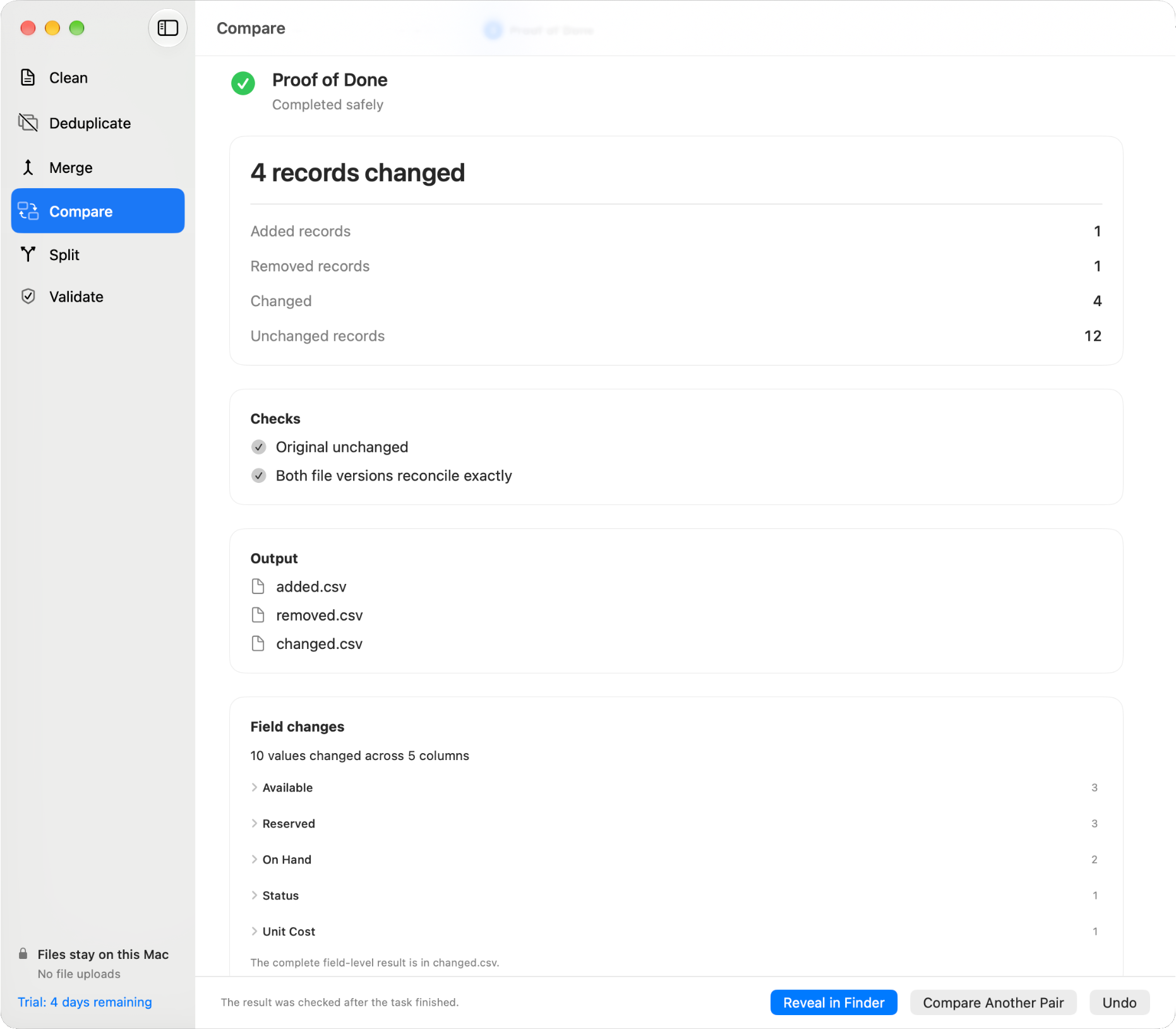
Each synthetic inventory export contains 17 rows. Matching the old and new versions by SKU gives this real result:
The files share 16 SKUs: 12 unchanged + 4 changed. The old file has one removed SKU; the new file has one added SKU. Each file therefore has 16 + 1 = 17 rows. Across both versions, 1 added + 1 removed + 4 changed + 12 unchanged = 18 distinct SKUs, not 18 rows in either file.
Synthetic inventory data, not a customer file. Four changed records contain 10 field-value changes across five columns; record counts and cell-change counts are different measures.
What SENOREL does — and doesn't do
Use a matching column present in both files. Resolve duplicate or blank identifiers and review schema differences before relying on a comparison; do not assume row order is a reliable match.
- Does: work with compatible CSV and flat XLSX tables; review comparison inputs; create a separate result.
- Does: keep spreadsheet processing local to your Mac and avoid overwriting the source files.
- Does not: refresh external connections, run macros, recalculate formulas or replace Power Query.
- Complex workbooks: structured comparison is limited to compatible workbooks. Review the file limits before relying on the result.
Prefer Excel? You can also compare files with lookup formulas or Power Query. SENOREL is a simpler focused option when you want to review one routine job rather than build and maintain a workbook workflow.
Common questions
What if a matching key is blank, repeated or missing?
A missing key column, duplicate key values or blank keys block the supported key-based comparison. Resolve the input problem before running; matching by row position is not a substitute for a reliable identifier.
What if the exports have different columns?
Review the schema differences shown in Preview. SENOREL does not silently repair them or infer a mapping between different supplier column names. Check that the shared key and the columns you intend to compare are compatible.
Review your next inventory change.
Start with two compatible exports and a reliable matching key. Processing runs locally on your Mac.
View SENOREL on the Mac App Store